Rotate
pl2 = Graphics.Rotate(pl, Angle, Options) returns a copy of the Graphics object pl turned by Angle (radians, counterclockwise), with all its layers; pl itself stays as it is. pl.Rotate(Angle, Options) turns pl itself and returns nothing. With the option “Layer” only one layer is turned.
Everything keeps its size and shape in mm: lines, curves, arcs, texts and bitmaps are turned as a whole, and texts are written at an angle. The page, and each layer, becomes the rectangle around its turned self, so an A4 page in landscape turned by 90 degrees is an A4 page in portrait, and a page turned by 30 degrees is larger than before. A bitmap turned by a multiple of 90 degrees gets its pixels rearranged; turned by another angle it is drawn at that angle.
Input
-
pl : a Graphics object.
-
Angle : Real, the angle in radians, counterclockwise.
-
Options : (optional) A table of options. Possible options are:
-
“Layer” : Integer or a list of integers, the layer to turn, with all layers in it. 0 is pl itself, 1 the first layer added to it, and -1 the last one; a list {n1, n2, …} is layer n2 of layer n1, and so on, as for Graphics.Add(). Default value 0
-
“Center” : {x, y}, the point to turn about, as fractions of the width and the height of the layer that is turned: {0, 0} is its lower left corner. Default value {0.5, 0.5}, its middle
Output
-
pl2 : a new Graphics object, pl turned. pl.Rotate returns nothing.
A layer, or a page, of width or height 0 can not be turned.
Example
A card with a text and two bitmaps is put four times on a page, as a layer, and each copy is turned about its own middle by 0, 30, 60 and 90 degrees. The output gives the size of the four layers and of the whole page turned by 90 degrees.
Input
- Example.Quanty
-- a page of 200 mm by 100 mm
pl = Graphics.New({{"Canvas.Size.X",200}, {"Canvas.Size.Y",100}})

-- a card of 40 mm by 20 mm: a grey background (a bitmap of one pixel), a bar of 8 colors (a bitmap
-- of 8 by 1 pixels), a frame and a text. Bitmaps are drawn below lines and texts, in the order added.
Card = Graphics.New({{"Canvas.Size.X",40}, {"Canvas.Size.Y",20}, {"Canvas.Origin.Y",40}})
Card.Add({"BitMap", {0,0}, {1,1}, { {224} }})
Bar = {}
for k = 1, 8 do Bar[k] = {32*k-1, 0, 256-32*k} end
Card.Add({"BitMap", {0.1,0.1}, {0.9,0.3}, {Bar}}, {{"Pixelated",true}})
Card.Add({ {0,0}, {1,0}, {1,1}, {0,1} }, {{"Close",true}, {"Fill Color",0xFF000000}})
Card.Add("Quanty", 0.5, 0.45, {{"Alignment","c"}, {"Size",0.35}})

-- four copies of the card on the page, each a layer, turned by 0, 30, 60 and 90 degrees about its middle
for k = 0, 3 do
  Card.OriginX = 10 + 47*k
  pl.Add(Card)
  pl.Rotate(k*Pi/6, {{"Layer",-1}})
end

-- the canvas of a turned layer is the box around the turned card
T = Graphics.ToTable(pl)
for k = 1, 4 do
  print(string.format("card %d: %5.2f mm by %5.2f mm", k, T.Layer[k].CanvasSize[1], T.Layer[k].CanvasSize[2]))
end

-- the function form returns a turned copy: the whole page turned by 90 degrees is a page in portrait
Portrait = Graphics.Rotate(pl, Pi/2)
print(string.format("page:   %5.1f mm by %5.1f mm", pl.SizeX, pl.SizeY))
print(string.format("turned: %5.1f mm by %5.1f mm", Portrait.SizeX, Portrait.SizeY))

file = io.open("Rotate.svg", "w")
file:write(Graphics.ToSVG(pl, {{"RelativeSize",true}}))
file:close()
Result
card 1: 40.00 mm by 20.00 mm
card 2: 44.64 mm by 37.32 mm
card 3: 37.32 mm by 44.64 mm
card 4: 20.00 mm by 40.00 mm
page:   200.0 mm by 100.0 mm
turned: 100.0 mm by 200.0 mm
The script writes Rotate.svg, the page pl. The card turned by 30 degrees fills a box of $40 \cos 30^\circ + 20 \sin 30^\circ = 44.64$ mm by $40 \sin 30^\circ + 20 \cos 30^\circ = 37.32$ mm; the card itself keeps its size of 40 mm by 20 mm.
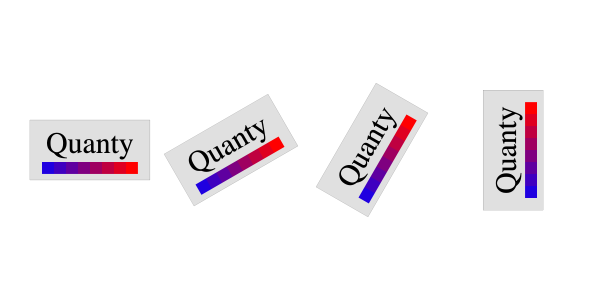
Table of contents
-